

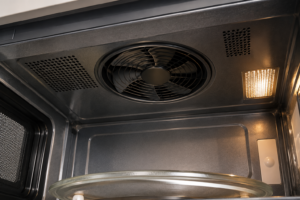
Is the vent fan on your over-the-range microwave running constantly, even when the microwave is off? A fan that will not shut off is annoying and wastes energy, but the cause is usually a simple setting or a heat sensor doing its job a little too well.
Here is why a microwave fan runs nonstop and how to stop it.
This article will teach you:
- Why the vent fan runs on its own
- How the auto fan feature works
- What to check first
- When a sensor or board has failed
Why the Fan Won’t Shut Off
Over-the-range microwaves have an automatic fan that protects the electronics from heat rising off the cooktop. When it will not stop, the usual causes are:
- Manual fan mode left on, the simplest explanation.
- Heat from the cooktop or nearby appliances keeping the auto fan running.
- A stuck fan thermostat reading high heat that is not there.
- A control board fault that will not switch the fan off.
What You’ll Need
- Your owner’s manual
- A screwdriver
- A multimeter
How to Fix a Fan That Won’t Stop
Start with the easy checks.
- Turn off manual mode. Press the vent fan button through its settings to confirm it is not simply switched on.
- Let it cool. If you just cooked, the auto fan may run until the microwave senses it has cooled down.
- Check nearby heat. Make sure a hot cooktop or appliance below is not keeping the sensor warm.
- Test the thermostat. With the unit unplugged, check the fan thermostat, which can stick closed and run the fan nonstop.
Pro Tip: Give the fan 20 to 30 minutes after cooking before deciding it is broken. The auto feature commonly runs that long to clear heat, which is normal behavior.
When to Look a Little Deeper
Because the vent fan ties into the microwave’s venting and controls, it helps to understand that system, and reviewing a microwave exhaust fan problem or a microwave damper replacement helps. Control faults that appear alongside can trace to magnetron and circuit issues.
If the venting hardware or control is at fault, you can replace a microwave air damper, or work through a microwave control panel repair.
When to Call a Pro
If manual mode is off, the unit has cooled, and the thermostat tests good but the fan runs on, the control board is likely stuck. A technician can confirm the board.
Wrapping Up
A nonstop vent fan is usually a setting or a heat sensor. Here’s the recap:
- Confirm manual fan mode is off.
- Allow time for the auto fan to cool the unit.
- Check for heat sources below the microwave.
- Test the fan thermostat if it still runs.
Rule out the setting and the heat first, and the fan usually quiets down. You’ve got this.