

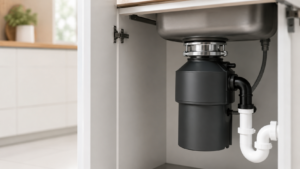
Flipped the switch and got nothing from your garbage disposal, or just a low hum? Before you call anyone, check the reset button. Most disposals have a built-in overload protector that trips to save the motor, and pressing its reset button is often all it takes to bring the unit back to life.
Here is what that little red button does, when to use it, and how to clear a jam safely first.
This article will teach you:
- What the reset button does and where to find it
- The signs that your disposal has tripped
- How to clear a jam and reset the unit safely
- Simple habits that keep it from tripping again
What the Reset Button Does
The reset button is part of an overload protector inside the disposal. When the motor draws too much power, usually from a jam or overheating, the protector trips and cuts power to prevent damage. That is why the unit goes dead.
You will find the button on the bottom of the disposal, under the sink. It is usually red and sticks out slightly when it has tripped. Pressing it back in restores power, as long as whatever caused the trip is cleared first.
Signs You Need to Reset It
- The disposal is completely dead when you flip the switch.
- It hums but the grinding plate will not turn.
- It shut off suddenly during use and will not restart.
How to Clear a Jam and Reset Safely
Ready? Safety comes first with any disposal.
- Turn off the wall switch and never reach into the disposal with your hand.
- If it is humming, clear the jam. With the power off, fit a hex or Allen wrench into the socket on the bottom center and work it back and forth to free the flywheel. You can also use a wooden spoon handle from the top to turn the plate.
- Remove the object that caused the jam with tongs or pliers, never your fingers.
- Let the motor cool for about ten minutes if it overheated.
- Press the red reset button on the bottom until it clicks and stays in.
- Restore power at the switch and run cold water.
- Test the disposal with the water running to confirm it grinds normally.
Warning: Always switch off the power before reaching near the disposal opening, and use tools rather than your hand to remove anything inside. The blades are sharp and the motor is strong.
When the Reset Does Not Hold
If the disposal keeps tripping or will not reset, the cause is usually deeper. A unit that repeatedly cuts out may be drawing too much current, which is covered in our guide to a disposal that trips the breaker. A hot, sharp odor points to a motor problem, explained in our look at a burning smell from the disposal.
If the motor seems fine but the flywheel is stuck or damaged, it helps to understand what happens when the flywheel fails, and for stubborn internal problems you can take the disposal apart for a closer repair.
Keep It From Tripping Again
A little care prevents most resets. Run cold water before, during, and after grinding, feed waste in slowly, and avoid fibrous or hard items that jam the plate. Keeping it clean helps too, as shown in our guide to cleaning and deodorizing the splash guard.
Wrapping Up
The reset button is the first thing to try on a dead or humming disposal. Here’s the short version:
- Switch off the power and never use your hand inside.
- Clear any jam with a hex wrench or a wooden handle.
- Let the motor cool, then press the red reset button.
- Restore power, run cold water, and test.
Most of the time, that button is all that stands between you and a working disposal. You’ve got this.